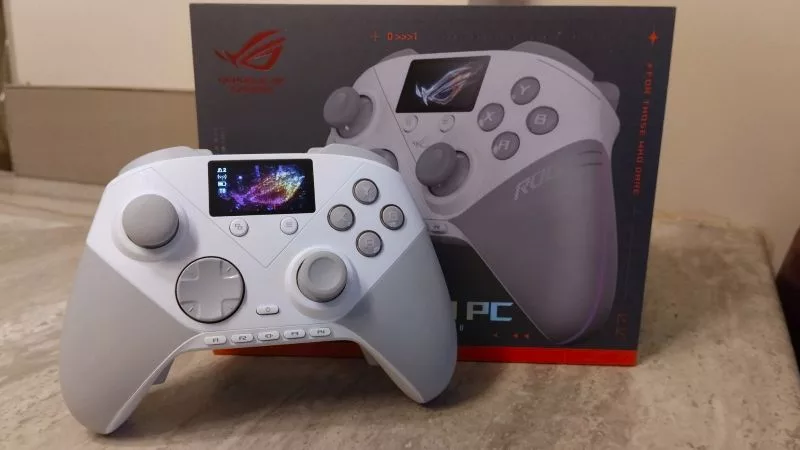
The ROG Raikiri II Pro PC gives me the controller customization I need to thrive

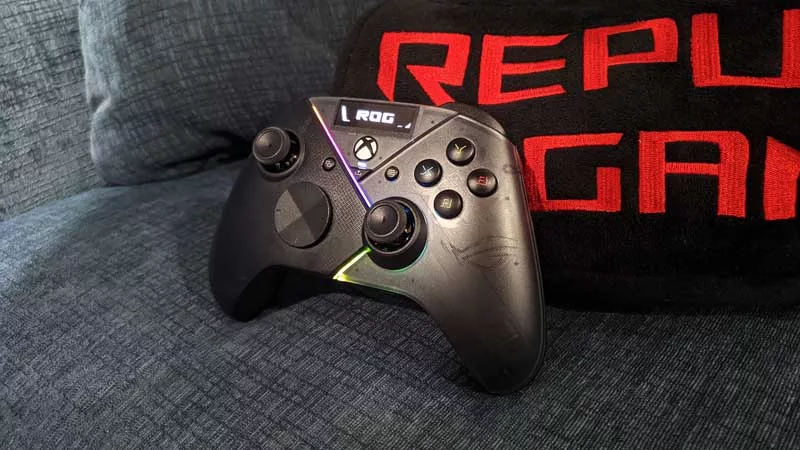
I'm the kind of PC gamer who loves playing from the couch — slouched in some position no ergonomist would approve of, where a gamepad beats a keyboard and mouse setup every time. But when things get intense, I still need a controller that can keep up. That's where the ROG Raikiri II Pro PC controller comes in. Between its tactile micro-switch buttons, deep customizability, and outstanding battery life, it's never been easier to be a couch-first PC gamer who likes to stay comfy and competitive.
The Raikiri II Pro PC's responsiveness keeps me in every fight
Not every fighting game player would risk going wireless. Many default to a wired controller or a dedicated fight stick if they're worried about latency, responsiveness, or the level of precision competitive play demands. But the Raikiri II Pro PC satisfies all those needs.

With up to an 8000Hz wireless polling rate over a 2.4GHz connection, inputs on the Raikiri II Pro PC are practically instantaneous. Combine that with its low-travel micro-switch buttons and dual-mode triggers, and the quickest button presses I can execute register on-screen in record time. That's the kind of responsiveness I need when playing Marvel Tokon: Fighting Souls — an intense fighting game where I need every advantage I can get, every single frame.
The wireless responsiveness and tactile, clicky buttons feel great on their own, keeping me on a level playing field with my opponents. But the Raikiri II Pro PC lets me go further with button remapping and macro recording. If I don't like reaching all the way to a trigger to execute a certain move, I can remap it to one of the controller's bonus bumpers for easier access. And with macro recording, I can turn a multi-input command into a single button press.

In Marvel Tokon, summoning an ally fighter takes a directional input plus a face button. With the Raikiri II Pro PC's onboard macros, I mapped each of those direction-and-button combinations to a different customizable back button on the controller's handles. Instead of juggling a directional input, a face button, and my movement and attacks all at once, I just tap one of those back buttons to summon an ally while my thumbs stay free for combos. I wouldn't dare use macros online — but locally, against friends who know I need every advantage I can get? You bet I'm digging deep into the Raikiri II Pro PC's bag of tricks.
That same customization pays off in other games, too. I spent a good chunk of the Call of Duty: Modern Warfare 4 open beta remapping inputs to make fragging effortless, all while enjoying the gamepad's mouse-like precision inputs.
I also get a kick out of the Raikiri II Pro PC's customization options on the cosmetic front. Its customizable display lets me upload my own images, and its RGB lighting spans three zones I can tune independently — so I can theme the controller to whatever I'm playing, whether that's the bubbly Sonic Racing: CrossWorlds or the ultra-grim The Blood of Dawnwalker.
A robust accessory lineup elevates the experience
It's one thing to have the perfect gamepad. It's another to see it backed by a lineup of accessories built to keep it going for years. The Raikiri II Pro PC ships with a portable protective charging case, a charging stand with feet, two spare TMR modules, a module removal tool, two alternate detachable joystick caps, and swappable covers for the rear buttons. I've already put a few of these items to good use.

For starters, I like my left stick to have a smooth surface, since I'm jamming my thumb against it constantly and don't want to fight any friction. The Raikiri II Pro PC includes an optional smooth cap I can swap on with zero tools in just a few seconds.

The controller also includes a long-neck cap for whenever I need extra sensitivity — in shooters, for example. And should I want a lighter touch, the controller packs optional TMR modules with a different force curve. I can safely and easily swap them in using the included module removal tool, letting me tailor the joystick feel to my liking.

Combine all of that with a charging stand that doubles as a 2.4GHz receiver extender for more stable wireless performance, and I've got everything I need to go the distance.
The Raikiri II Pro PC is ready for those who dare to play hard
Between its accessories and onboard customization options, I've made the Raikiri II Pro PC truly mine. And when I want to go even further — tweaking stick deadzones or uploading custom imagery to the display — I can do that too, through the Gear Link web app.

There are so many ways to tune this gamepad to my liking that I feel equipped for any genre I throw at it. With the Raikiri II Pro PC, I can play all of them at a pro level, wirelessly, from my couch — knowing I've got the most versatile PC controller ROG has ever made.
Check out your local retailers for pricing and availability, and get ready to bring your A-game.
Author
Popular Post
How to configure your PC's RGB lighting with Aura Sync
Meet the ROG NUC 16: compact power for gaming, AI workloads, and beyond
The 2026 ROG Strix G16 and G18 raise the bar for gaming laptops once again
Pre-order your ROG XBOX Ally X20 today, standalone or as part of an incredible ROG 20th anniversary bundle

The ROG XREAL R1 gaming glasses let you game anywhere on a 171-inch 240Hz virtual screen
LATEST ARTICLES
The ROG Raikiri II Pro PC gives me the controller customization I need to thrive
The ROG Raikiri II Pro PC controller has revolutionized my ability to go pro from the comfort of my couch.

The ROG Kithara just benched every other gaming headset I own
Just about everything I ask for in a premium gaming headset, the ROG Kithara does with gusto.

The ROG Raikiri II is my new go-to game controller — and I can’t put it down
I'm a PC gamer who plays on the couch — and the new ROG Raikiri II is the lynchpin of my living room battlestation.